Confirm today's class
Every morning the app asks whether today's class is on. Answering No is the only thing that stops your students' reminder — silence means the class runs — and it's where you choose whether to announce the cancellation.
For group owners, admins, staff and instructors · 8 min · Updated 2026-09-17
Thirty minutes before each class, Ginga Nation sends a reminder to the students enrolled in it. That only works if somebody can stop it on the mornings the class is not happening — a holiday, a sick instructor, a flooded room.
So every morning the app asks you: Is there class today?
The important part, and the one thing worth reading twice: your "Yes" changes nothing. Not answering and answering Yes do exactly the same thing — the reminder goes out. Only No stops it. The question exists to catch the exception, not to unlock the normal day, because a system where a busy morning silently cancels everyone's reminder is a system nobody trusts by week three.
Before you start
- You need the mobile app. There is no version of this screen in the hub.
- You need a role in the group — owner, admin or staff — or you need to be set as the instructor on that specific schedule. Instructors can answer for their own classes even with no role in the group at all.
- The schedule must be active, and today must be its weekday. See Build your weekly schedule.
- The schedule's time zone must be right. Everything on this page — the morning question, the reminder, even which calendar day "today" is — is worked out in the venue's time zone, not yours and not your students'.
- Your students must be enrolled in that schedule to get a reminder. Being an active capoeirista in the group is not enough. Enrollment is per class, under Manage school → Take attendance → the class → Students in this class.
- Students need the app installed, with notifications allowed.
What arrives, and when
8 in the morning, at the venue
The question goes out during the 8am hour in the schedule's own time zone. A class in Brussels gets asked at 08:00 Brussels time and a class in Mexico City at 08:00 Mexico City time, whatever time it is where you are standing.
If you coordinate a group in another country, expect the notification on their clock, not yours.
One notification, all of today's classes
You get one notification per group, not one per class. It is titled Is there class today? and lists each class on its own line — time, class name, location — followed by Confirm so we can remind your students.
The time on each line is the venue's local time.
Tap it
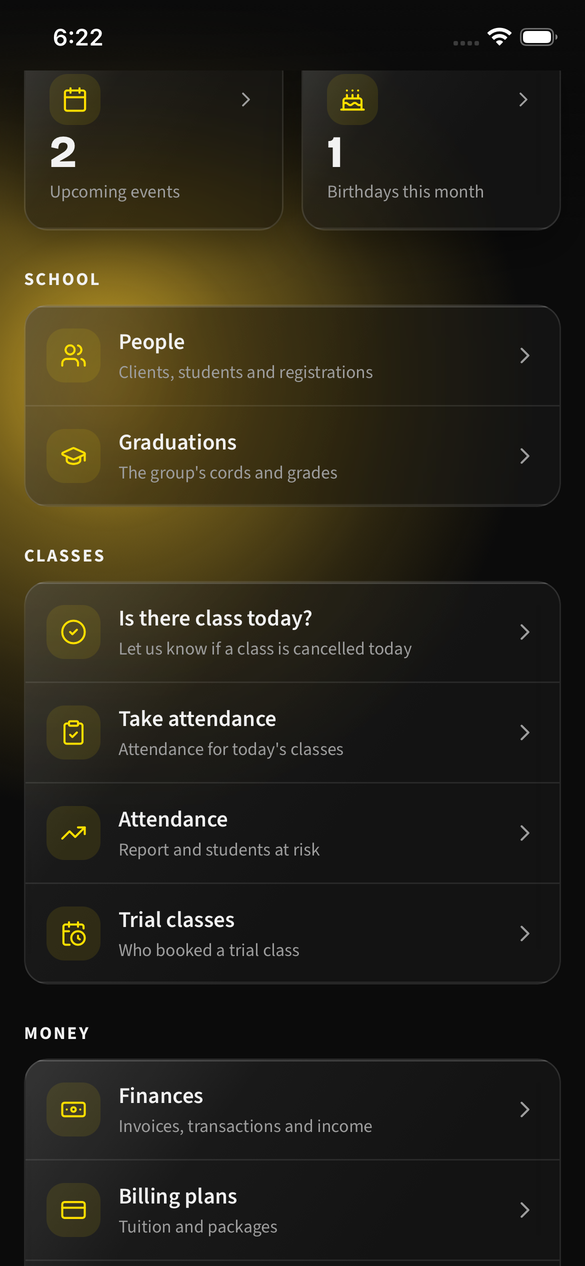
The notification opens Is there class today? directly. You can also reach the screen any time from Manage school, in the classes section, under Is there class today?
Who actually gets the notification
| Who | Gets the morning notification | Can answer |
|---|---|---|
| The schedule's instructor | Yes — they are asked first | Yes |
| Owner / admin of the group | Only as the fallback, below | Yes |
| Staff of the group | No | Yes |
The fallback to owners and admins fires whenever the instructor cannot be reached: no instructor set on the schedule, an instructor who is a capoeirista without an account, or one who has turned class notifications off. It is not only about the empty-instructor case — without the fallback, a class taught by somebody with no app would have nobody to ask, and the question would vanish in silence.
Answer it
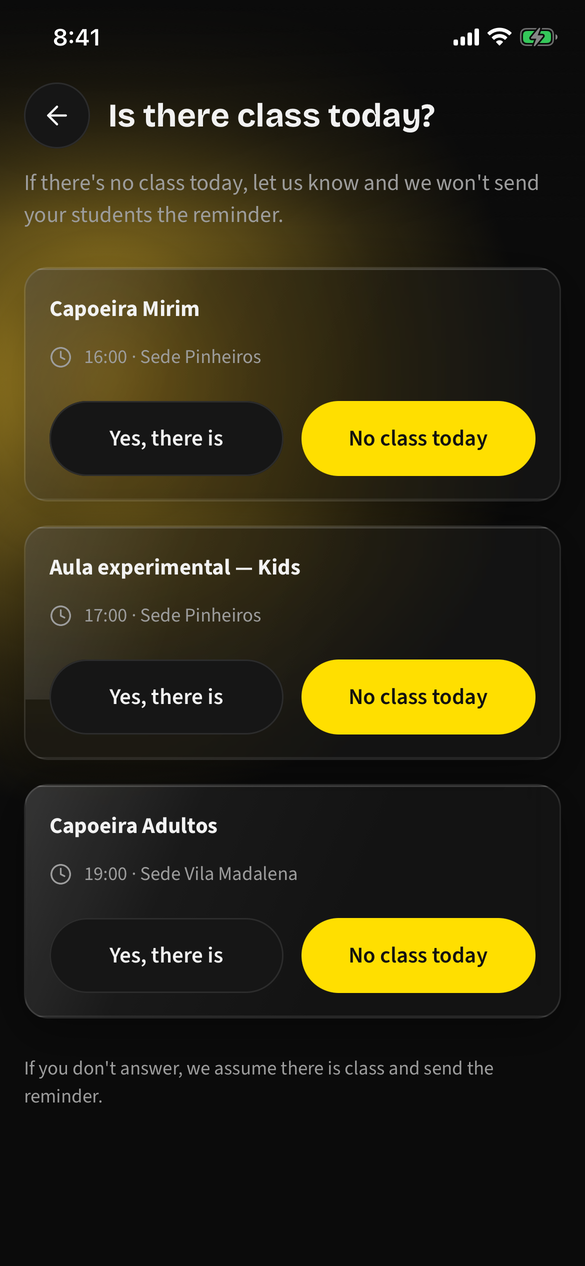
The screen lists today's classes you can answer for: the ones in your groups and the ones you teach. Each card shows the class name, the venue's time and the location, and two buttons.
| Button | What it does |
|---|---|
| Yes, there is | Marks the session Confirmed. The reminder goes out — exactly as it would have anyway. |
| No class today | Opens the cancellation sheet, where you decide whether to announce it. See Cancelling a class below. |
| (you close the app) | The session stays pending. The reminder goes out. |
That is why No class today is the solid, prominent button and Yes, there is is the quiet one. The screen is built for the rare morning, not the ordinary one.
Once answered, the card carries a Confirmed or Cancelled badge and that button is disabled. Answering again with the other button is allowed until the reminder goes out.
A cancelled card also says what happened to the announcement — They were told or They were not told — followed by the reason, if you gave one. That line exists so you never have to guess whether the message went out, because the cheap way to resolve that doubt is to press the button again.
A class that has already started is not asked about. A 07:00 class never gets an 8am question, and any class whose start time has passed shows This class has already started. with no buttons. There is nothing useful left to answer.
What your students get
Between 20 and 40 minutes before the class starts — in practice, about half an hour — every student enrolled in that schedule gets a push notification in the Ginga Nation app.
It reads, for a student notified about their own class:
Your class starts in 30 min 19:00 · Capoeira Adultos · Sede Centro. Get your abadá and cordão ready.
And for a parent being told about their child:
Ana's class starts in 30 min 19:00 · Capoeira Adultos · Sede Centro. Don't forget the abadá and cordão.
A few things worth knowing about it:
- The channel is a push notification in the app. Not WhatsApp, not email. A student without the app gets nothing.
- The time shown is the venue's, so a student travelling abroad still reads the real class time rather than a converted one.
- One parent, one notification. A guardian with two children in the same class gets a single push naming both, not two.
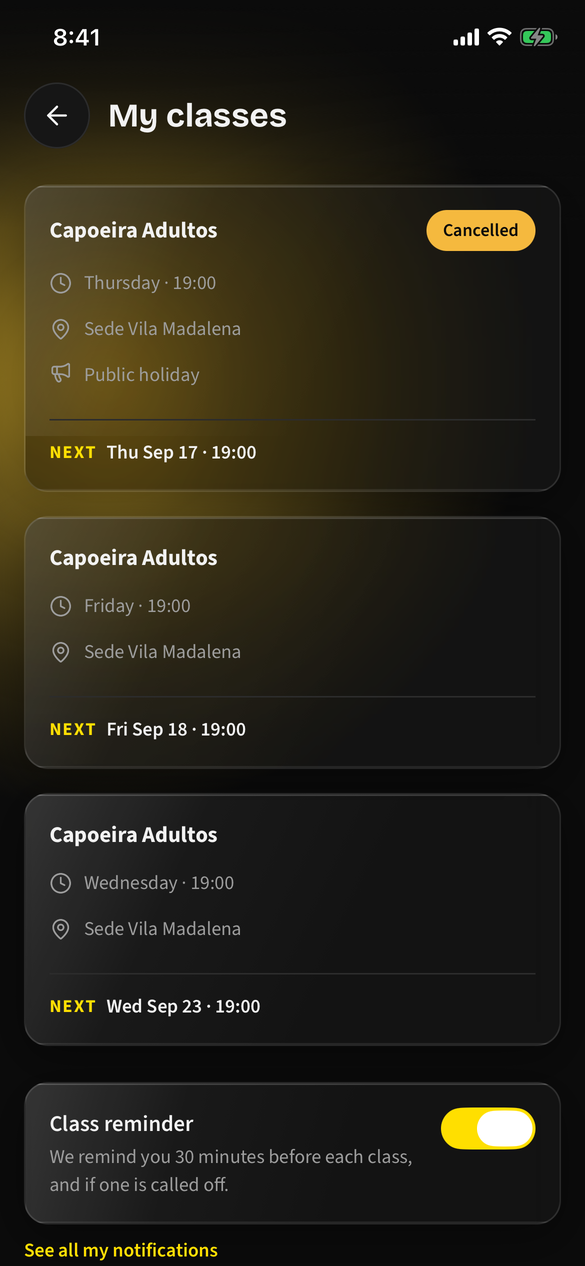
- Tapping it opens My classes, where students see every schedule they are enrolled in, the next occurrence of each, and a Cancelled badge on the ones you have called off. That screen also carries the switch that turns these reminders off, so nobody has to go hunting for it.
Cancelling a class
Stopping the reminder is not the same as telling anyone. Tapping No class today stops the 30-minute reminder, and that is all it does by itself — the class would come off in silence, and a student who does not open the app finds out by showing up to a locked room. That is the exact problem the reminder exists to prevent, running backwards.
So No class today does not cancel on the spot. It opens a sheet with two things on it:
| On the sheet | What it is for |
|---|---|
| Reason | Optional. One line — public holiday, instructor sick, room taken. Up to 160 characters. |
| Tell my students | A switch, on by default. On: everyone enrolled gets a push. Off: the class is cancelled quietly, exactly as it used to behave. |
Then the button: Cancel and tell them, or Cancel without telling them if you turned the switch off.
The reason is optional on purpose. The cancellation you most need to communicate is the last-minute one, and a required field turns that into paperwork — people in a hurry type "x". Without a reason the message still does its job: no class today is already what a student needs in order to not leave the house.
The switch is on by default because announcing is almost always the right call. It is a switch rather than an automatic send because a message to your whole class should not go out from a tap you thought only silenced an alarm.
What your students receive
No class today Cancelled: 19:00 · Capoeira Adultos · Sede Centro. Public holiday.
Worth knowing:
- It rides on the same setting as the reminder. A student who turned Class reminder off does not get the cancellation either. It is one channel, and a cancellation is not a reason to slip past somebody's choice.
- The reason shows up in My classes too, under the Cancelled badge. A notification is seen once and swiped away; the question it leaves behind — why is there no class? — has to be answerable on the screen the student lands on.
- It only goes out for today. The message says "today", so the app refuses to send it for any other date — worked out, as always, in the venue's time zone.
- One announcement per class, ever. Tapping the button twice, or cancelling, re-confirming and cancelling again, still sends exactly one push.
Changed your mind about announcing
If you cancelled quietly and then decide people should know, the cancelled card grows an Tell them now button. It opens the same sheet with the reason you already wrote filled in, so you can add to it or send it as it stands.
This exists because there was no other way back: once a class is cancelled, the No class today button is disabled, and without this the announcement would be impossible to send.
What cancelling still does not do
It does not reach anybody who is not in the app. No WhatsApp, no email, no SMS — a student without Ginga Nation installed, or with notifications blocked at the operating-system level, gets nothing. For those, tell them the way you normally would.
Cancelling too late
If you tap No class today after the 30-minute reminder has already gone out, the screen says so:
The reminder had already gone out That class's reminder had already gone out, so your students received it. Best to let them know another way.
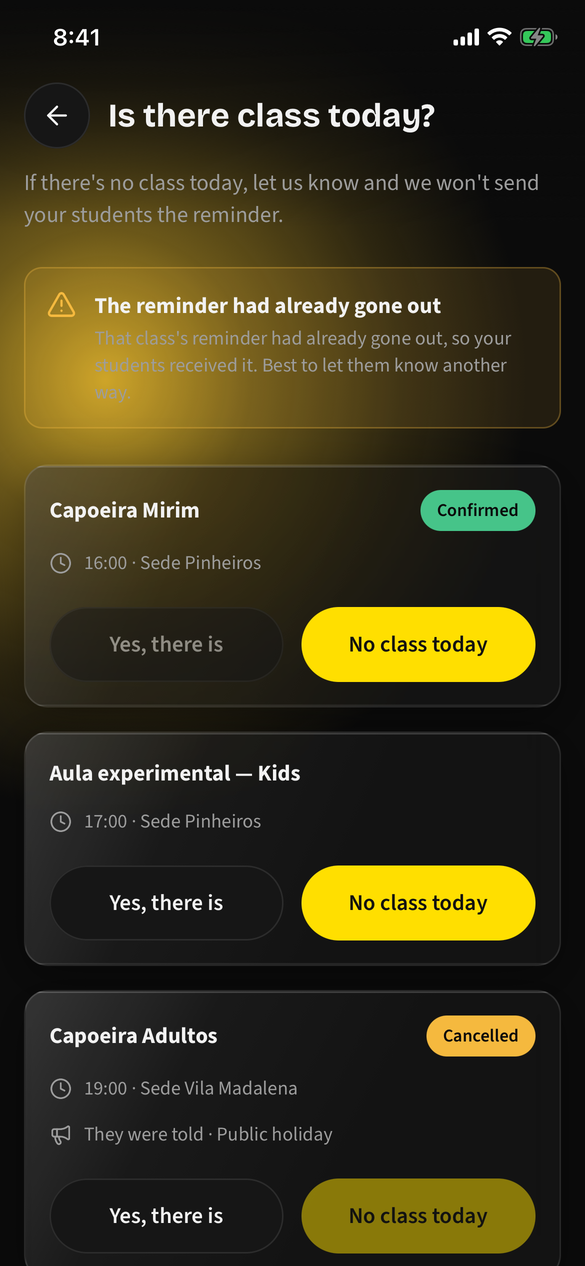
A notification cannot be recalled once sent. The session is still recorded as cancelled, which is correct for your records, but the message is out. This is the one case where answering early actually matters.
You can still announce it — leave Tell my students on, and the cancellation goes out after the reminder did. Two messages in a row is not elegant, but it beats a room full of people who were told to come.
Turning it off
Each person controls their own notifications in the app under Profile → Notifications.
Students have a shortcut: My classes — the screen the reminder opens — carries the Class reminder switch at the bottom of the list, along with a link to the full settings. It is there because that screen is where somebody is standing at the exact moment they wonder whether this will arrive every week, and sending them hunting through the profile menu right then is how you end up with a student who silences the whole app from the operating system — losing the cancellation notice along with the reminder.
It is the same setting in both places, so whichever one they touch, the other already agrees.
| Setting | What it covers |
|---|---|
| Class reminder | The 30-minutes-before reminder for students — and the morning "Is there class today?" question for you. Both ride on this switch. |
| Payments | When a payment or instalment is recorded. |
| Attendance | When somebody is marked present, with their progress that month. |
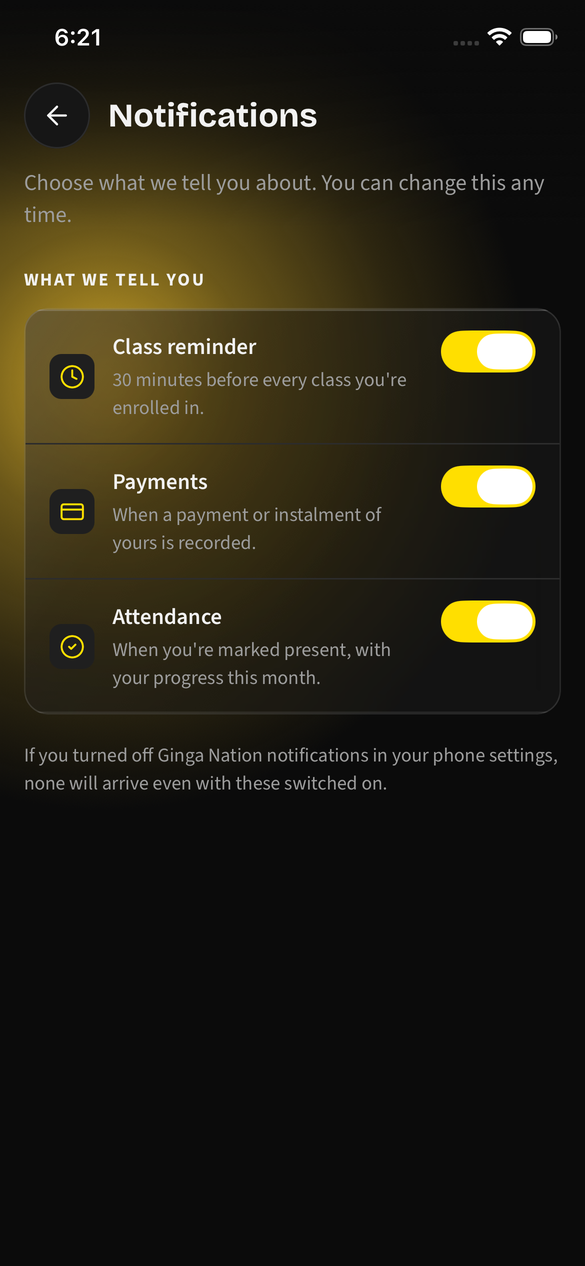
Turning off Class reminder stops your morning question too. They are the same setting. An instructor who switches it off will not be asked whether there is class — and their classes will keep reminding students every week, since silence means the class runs. If you do not want the question, better to leave it on and ignore it; the outcome is identical and you keep the ability to cancel.
All three default to on, and the phone's own notification permission sits above them: block Ginga Nation at the operating-system level and nothing arrives no matter what these switches say.
Troubleshooting
No morning question arrived. Check, in order: the schedule is active and today is its weekday; the class had not already started by 8am; Class reminder is on in your profile; and — if you expected it as an owner — whether the schedule has an instructor set, because they get asked first and you only hear about it if they cannot be reached.
You got asked at the wrong hour. The 8am is the venue's, taken from the schedule's time zone. If it lands at a strange hour for you, open the schedule and check that its time zone actually matches where the class is taught — a schedule created with the wrong zone shifts the question, the reminder and the class time all together.
Your students got no reminder even though the class ran. They have to be enrolled in that specific schedule, not just active in the group. Open Manage school → Take attendance → the class → Students in this class and check who is actually on the list. A class with nobody enrolled sends nothing at all.
One student never gets reminders. Most likely they do not have the app, or they have Class reminder switched off, or their phone is blocking Ginga Nation's notifications. All three are theirs to fix, not yours.
You cancelled but nobody heard about it. Open the card: a cancelled class says They were told or They were not told. If it says the latter, the Tell my students switch was off when you confirmed — tap Tell them now on that same card. If it says they were told and a particular student still did not hear, they have Class reminder off or no app; see the entry above.
Today's class is missing from the screen. It lists only classes in groups where you are owner, admin or staff, plus schedules where you are named the instructor. If a class you teach is absent, check that you are set as its instructor, or ask an owner to answer for it.