Get found in the directory
How your group appears in the public list and world map, and what makes a listing worth clicking.
For group owners, admins and staff · 6 min · Updated 2026-07-30
The directory is the public list of capoeira groups at
roda.ginganation.com/grupos, plus the world map on roda.ginganation.com and
the leaders page. It is where somebody who has never heard of your school
finds you.
You do not edit the directory. It is rendered from your public profile and your microsite. This page explains what visitors see, and which of your fields controls each part of it.
Before you start
Nothing to switch on. Your group is listed as soon as it exists and is active — there is no opt-in step and no submission to make.
What a visitor sees
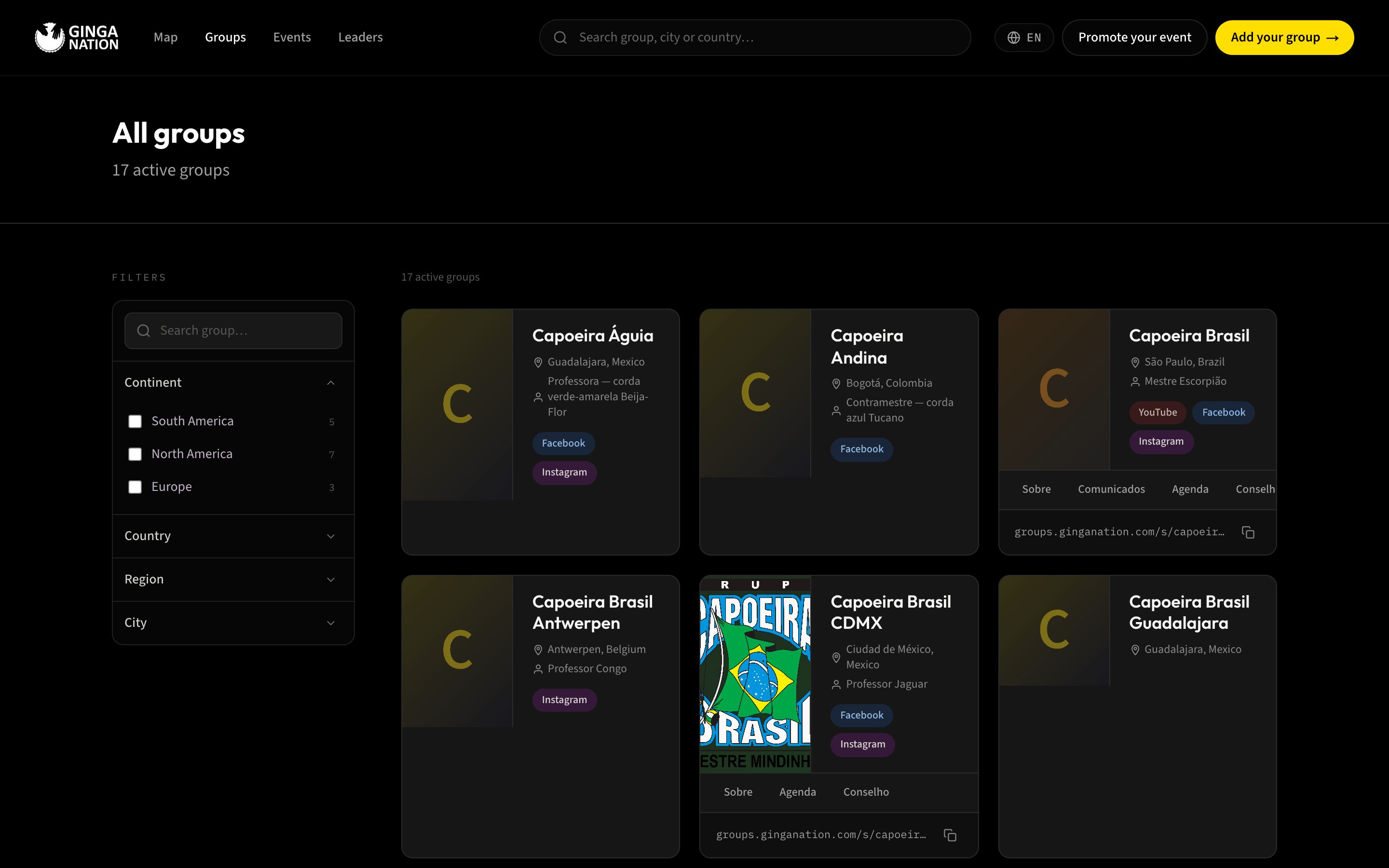
The list has a search box and four filter groups: continent, country, state and city. All four are built from the Location fields of your public profile — which is why a missing country code effectively hides you from browsing, even though your card still exists.
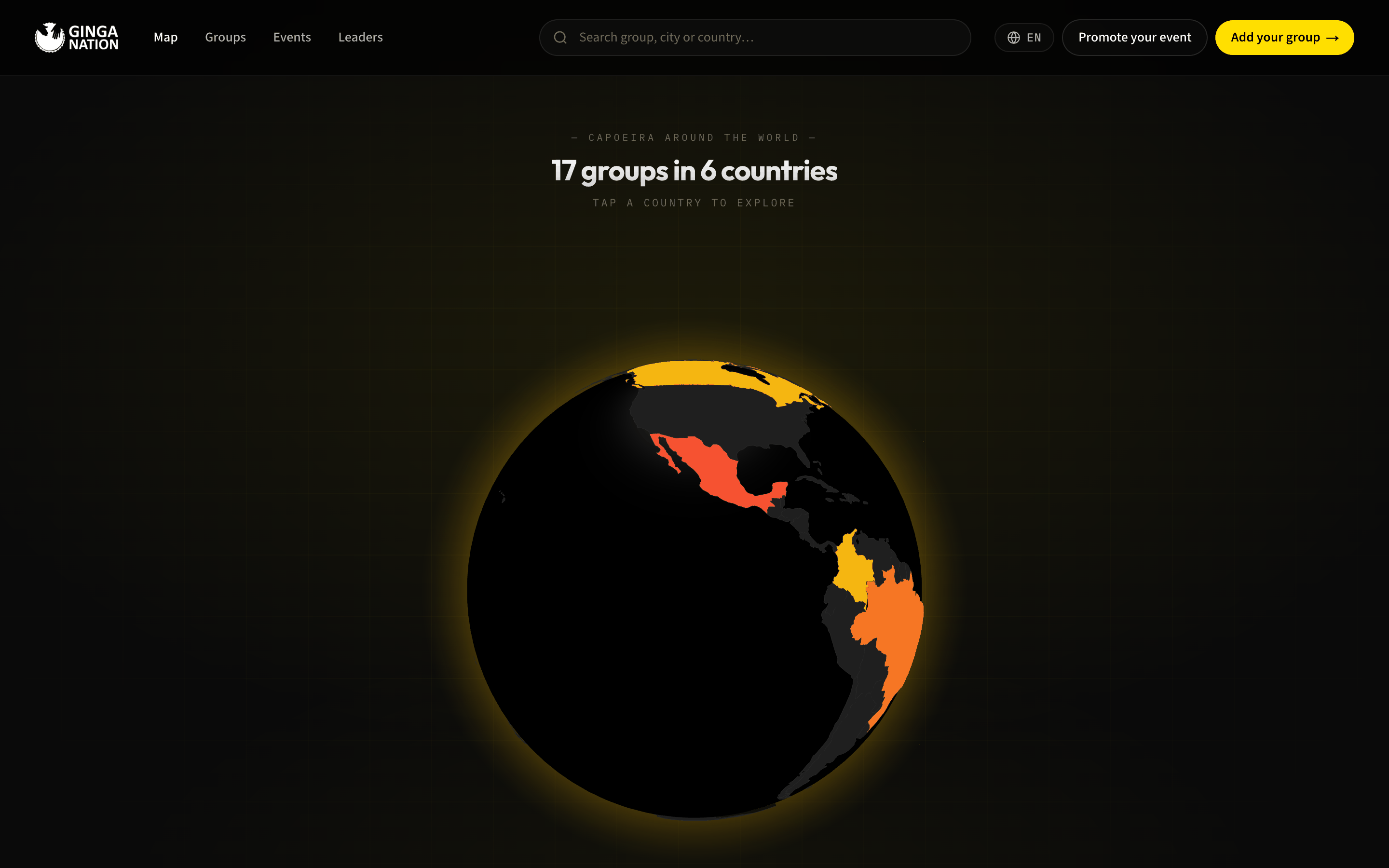
The world map on the platform's home page works the same way. It is an interactive globe that shades each country by how many groups it has — countries with none stay dark. Hovering shows the country name and its group count; clicking opens a panel listing the groups there, grouped by state.
Anatomy of a card
Every element on the card comes from a field you control:
| On the card | From |
|---|---|
| Logo (or the first letter of your name) | Logo in Public profile — or the logo you upload in Website |
| Group name | Group name |
| "City, Country" | City and Country |
| "Mestre Escorpião" | Graduation and Nickname under Leadership |
| Instagram / Facebook / YouTube / TikTok pills | Social media (up to five shown) |
| Row of section links | The sections you switched on in Website — up to four, with your Menu name if you set one |
The …/s/your-slug address with a copy button | Your microsite's address |
| Whether the card is clickable at all | Whether your microsite is Active |
Without an active microsite, the card has no links, no section row and no address — it is a poster, not a door. Every other field can be perfect and the visitor still has nowhere to go.
What makes a listing look complete
Work down this list. Each line is one field, and each one is visible on the card.
Listings that nobody manages yet
Not every card in the directory belongs to a group that uses the hub. Some were added through the public sign-up form so the map would reflect the real world before those groups had accounts.
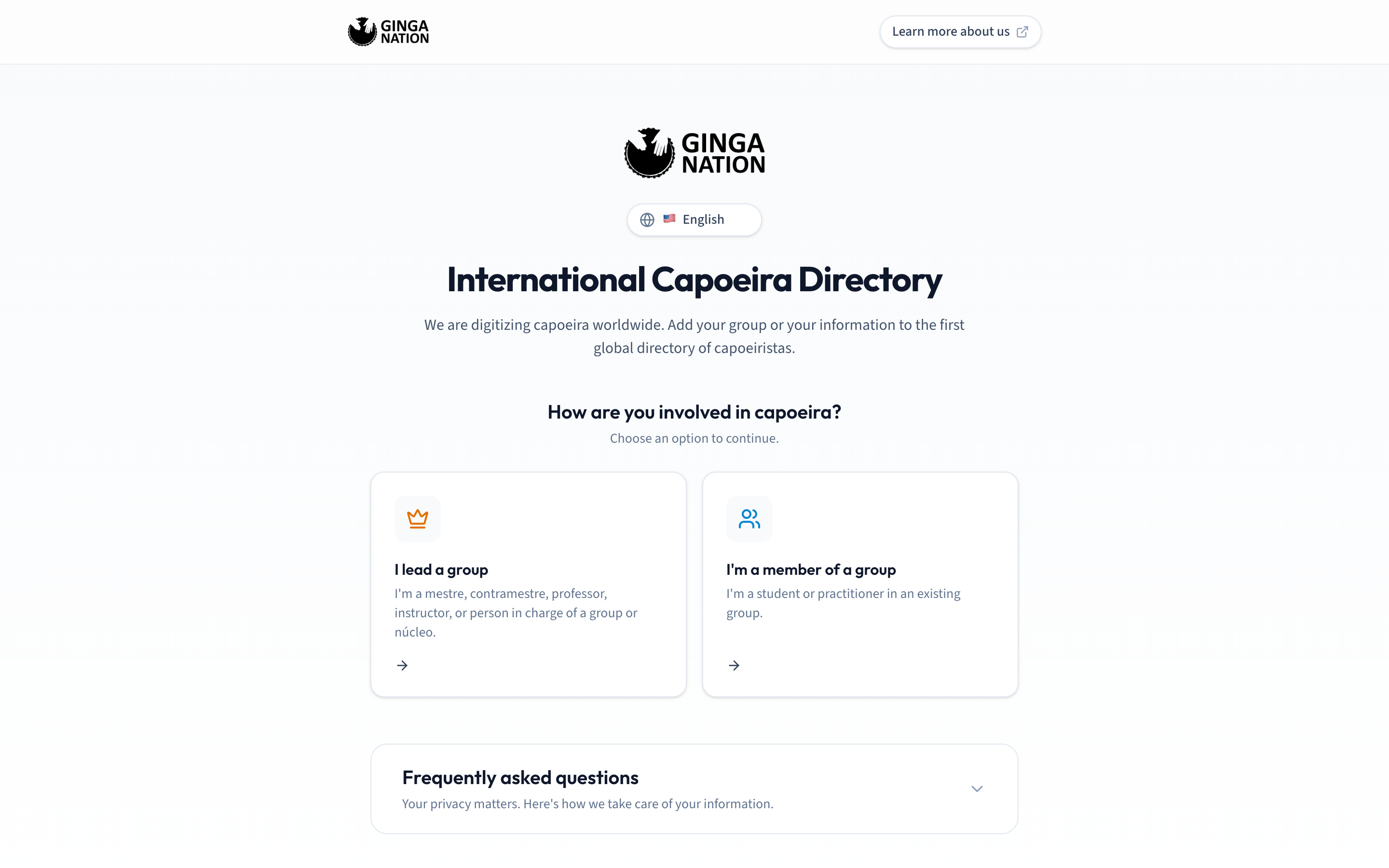
That form lives at /directorio on the hub's domain and needs no login. It is
titled International Capoeira Directory and starts by asking "How are you
involved in capoeira?", with two paths:
- I lead a group — "I'm a mestre, contramestre, professor, instructor, or person in charge of a group or núcleo." Collects Group details (name, logo, country, state, city, Instagram, Facebook) and Leader details (name, last name, capoeira nickname, graduation, email, phone).
- I'm a member of a group — collects the person's own details plus the name of the group they belong to.
Both paths end with a consent checkbox and a Submit, then a Thank you for joining! screen with a Copy link button for passing the form on.
There is no "claim this group" button anywhere in the product today, and nothing in the hub or on the public site marks a listing as verified or unverified. The form's own FAQ is explicit about it: "Soon you'll be able to claim and edit your profile from your account. Meanwhile, email us at ginganation@capoeirapuebla.com with any changes you need." If a card for your group exists and you cannot edit it from your hub account, that email is the route.
The form's FAQ also states what it does with the data: only public information — group name, city, country, social media — is shown in the directory, private contact details are not, nothing is sold to third parties, and deletion requests sent to that address are processed within 7 days.
What you should see
Go to roda.ginganation.com/grupos and search for your group's name. You should
find exactly one card, with your logo, your city and country, and your leader's
line. Clear the search and use the country filter — your group should be in
there too.
If your microsite is active, click the card: it should land on your page. The strip at the bottom of the card is your shareable address; the button next to it copies it.
Directory pages are cached for about a minute. Give an edit a moment before concluding it did not save.
Troubleshooting
Your group is not in the country or continent filters. The Country field
in Public profile is empty or is not a two-letter code. Set it to BR, MX,
BE, and so on.
Your card is there but not clickable. Your microsite is Inactive, or it was never published. Open Website, switch it to Active on the Configuration tab and click Publish.
The section links on your card are wrong or missing. They mirror the sections switched on in Website → Configuration → Sections, and only four are shown. Only Blog, Agenda, Directory and Census produce a link.
Your group is missing from the directory entirely. The listing follows the group being active on the platform, which is not something you can toggle from these screens. Contact Ginga Nation.
"This email is already registered in Ginga Nation." You are filling in the public sign-up form with an email that already has an account. You do not need the form — sign in to the hub and edit your public profile instead.