Share a receipt
Give a student proof of payment as an image or a private link.
For group owners and admins · 5 min · Updated 2026-07-30
Every payment you record produces a receipt automatically. You do not create one: you open it, and then either download it as an image or share its link.
A receipt belongs to an income transaction, not to an invoice. That has two consequences worth knowing up front: an expense never has a receipt, and an invoice paid in three instalments has three receipts, one per payment.
Before you start
- You need to be owner or admin. Staff do not see the Receipts tab's contents.
- The payment has to be in the ledger already — see Record a payment.
- Set the date range to a window that contains the payment. The Receipts tab is filtered by the date the money moved.
Steps
Open Finances → Receipts
Every income transaction in the range is listed, with columns Student, Concept, Amount, Date and Method. The search box (placeholder Student, concept…) matches the name, the email, the description and the category. When the range holds no income it says "No receipts in this range".
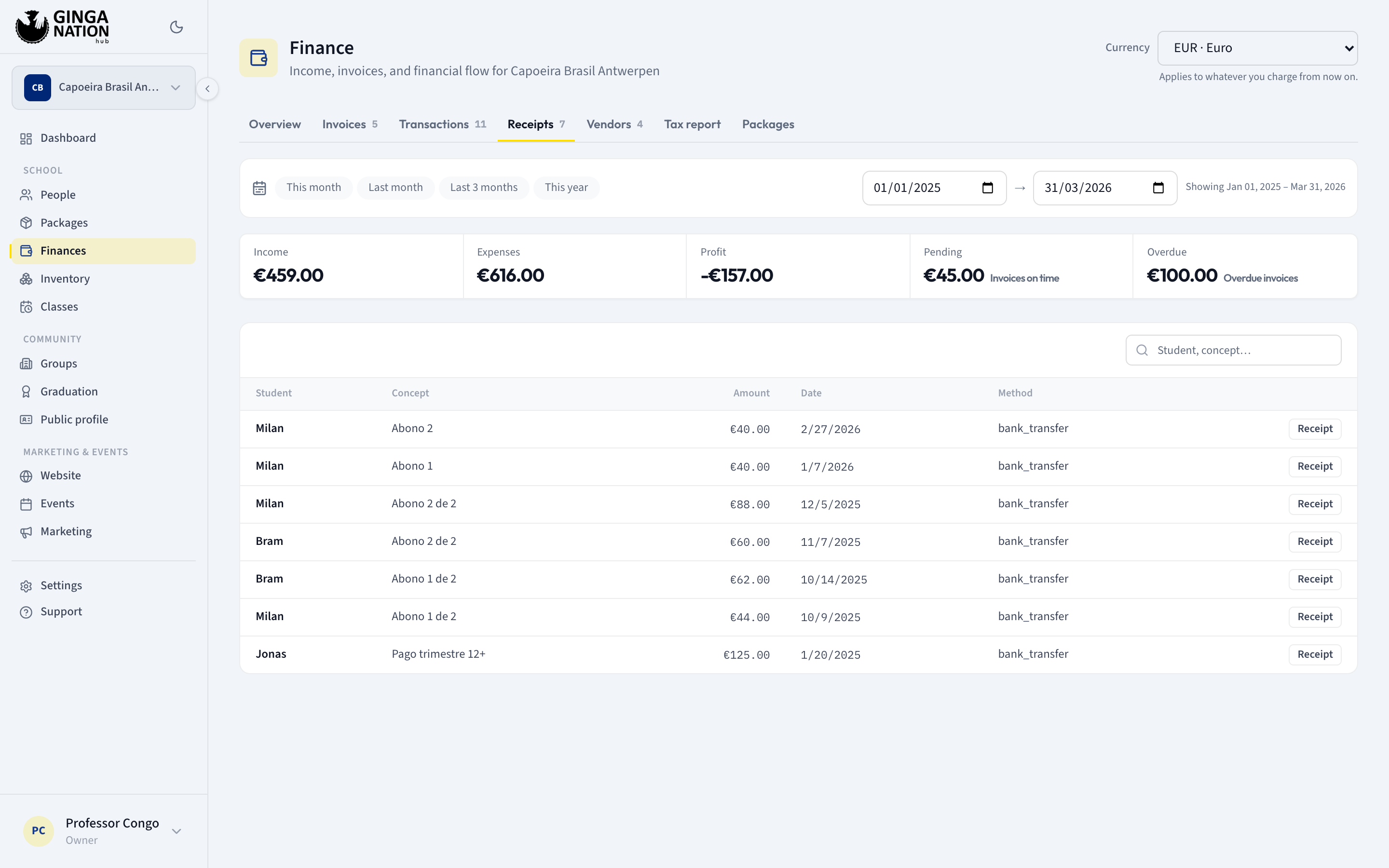
Click Receipt at the end of the row. You can also reach the same thing from the Transactions tab — the small document icon on any income row, or View receipt at the foot of the transaction's detail panel.
Read what is on it
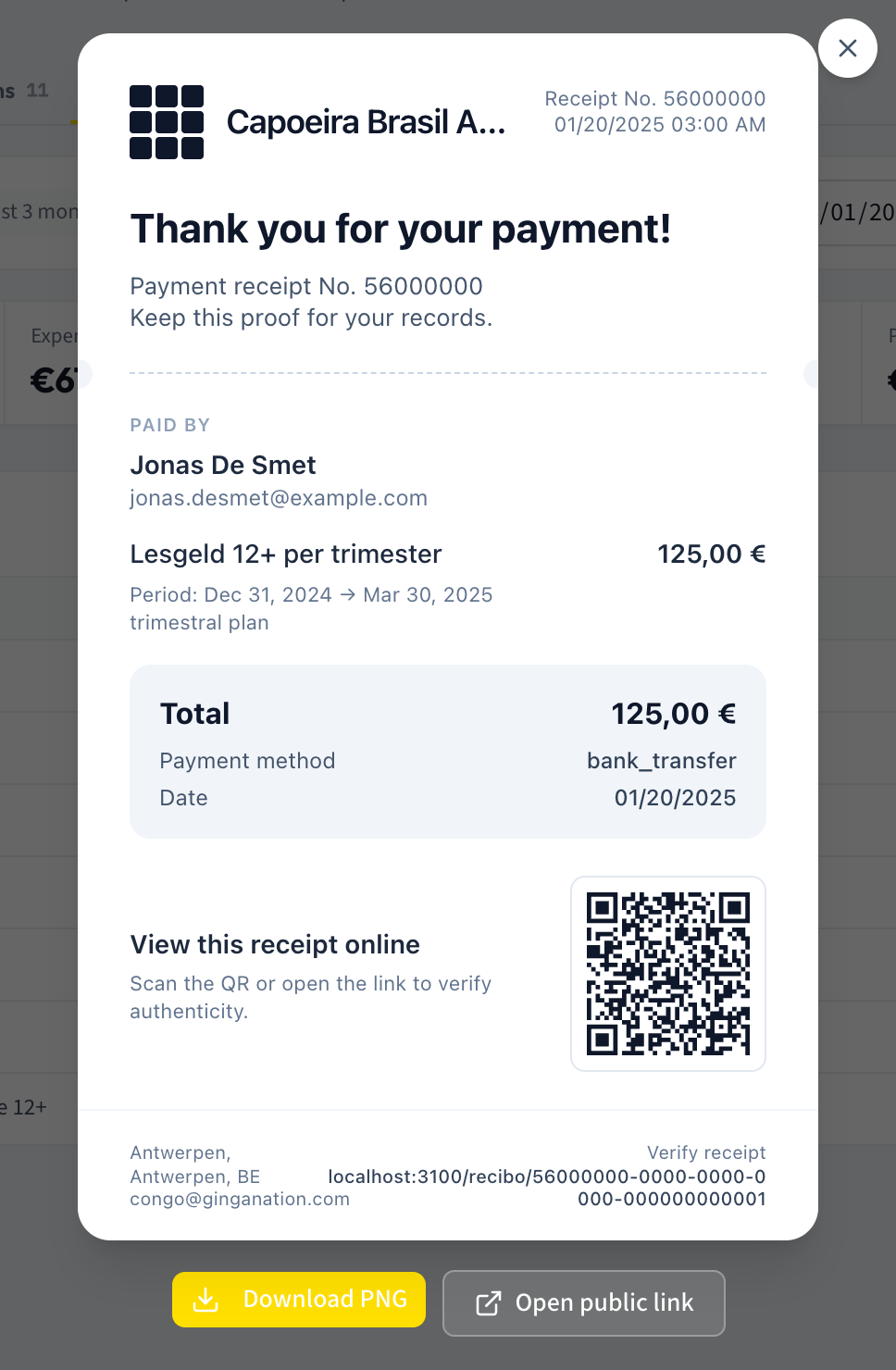
The card carries, top to bottom:
- your group's logo and name (a generic mark and "Ginga Nation" if your group has no logo yet)
- Receipt No. and a short code, plus the date and time of the payment
- Thank you for your payment!, then Keep this proof for your records.
- Paid by — the payer's name, and their email
- one line describing what was paid: the plan's name when the payment settled a plan invoice, otherwise the payment's description or category
- Period: and the invoice's period, when the payment was against an invoice
- a total block with Total, Payment method and Date
- a QR code beside View this receipt online and Scan the QR or open the link to verify authenticity.
- a footer with your group's city, state and country, your group's contact email, Verify receipt and the receipt's web address
The short code after Receipt No. is derived from the payment's internal identifier. It is not a sequential receipt number and it is not a government-recognized tax document number — Ginga Nation does not issue fiscal documents. If you need one, your own tax software still has to produce it.
Send it as an image
Download PNG renders the card to a high-resolution image and saves it. The button reads Generating... while it works. This is the version to send over WhatsApp: it needs no login, never expires, and cannot be traced back to anything else in your hub.
The image you download includes the payer's email address, because you are entitled to see it. Before forwarding a receipt to anyone other than the person who paid — an accountant, a group chat, a parent who is not the payer — remember that their email is printed on it.
Or send the link
Open public link opens the receipt's own page, at an address ending in the payment's identifier. The hub builds that address from whatever address you are using it at, so copy the link from the button rather than typing it from a screenshot — including the two on this page, which were captured on a development machine and therefore show a different host from the one you will see.
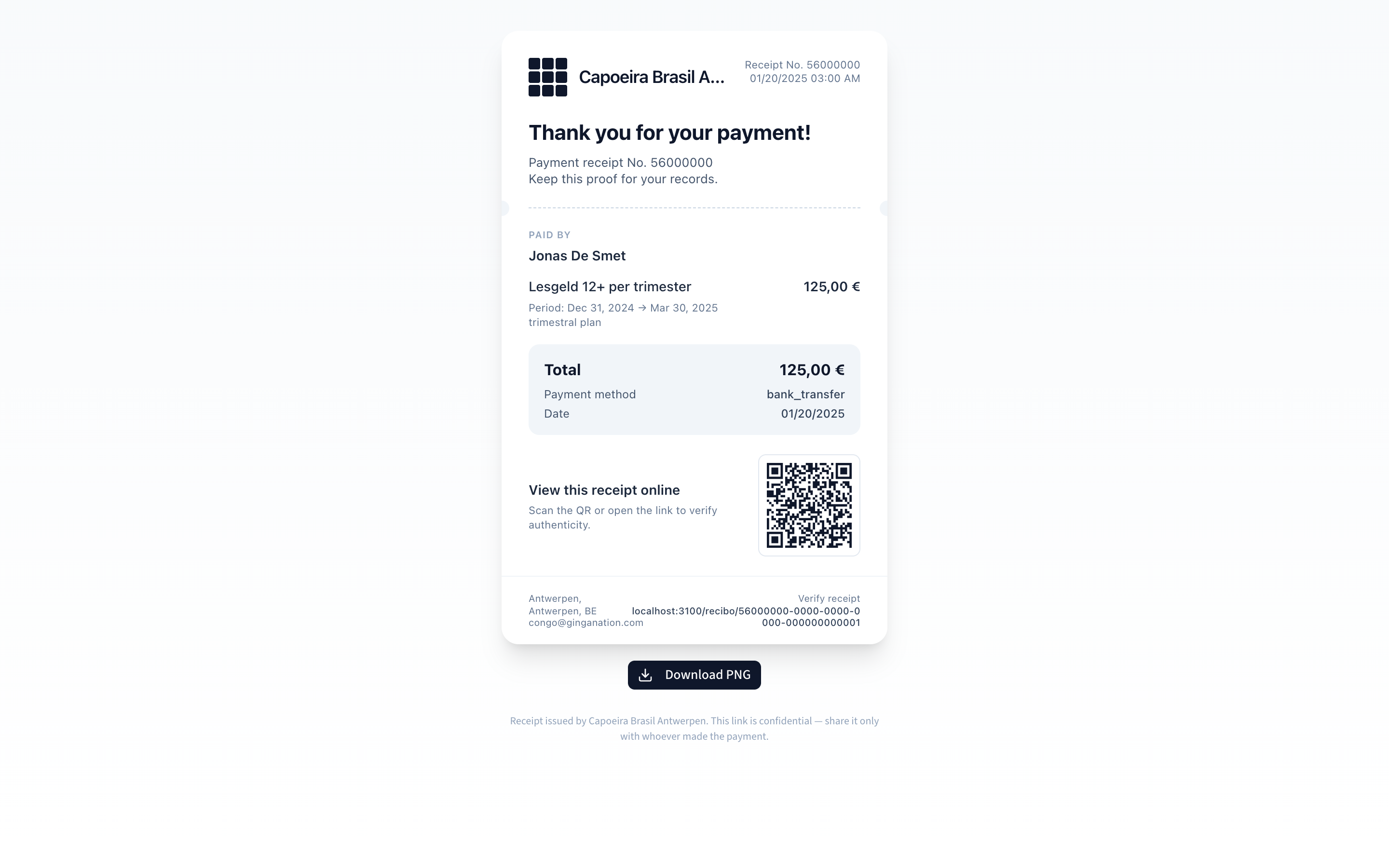
That page needs no login: the person you send it to just sees the same card, plus its own Download PNG button and this note at the bottom:
Receipt issued by [your group's name]. This link is confidential — share it only with whoever made the payment.
What is actually public at that link
This matters, so here it is precisely. The page is not indexed by search engines and the address is unguessable, but anyone holding the address can open it without signing in. What they see:
| Shown to anyone with the link | Shown only to the payer, or to your owners, admins and staff |
|---|---|
| Your group's name and logo | The payer's email address |
| Your group's city, state and country | |
| Your group's contact email | |
| The payer's name | |
| The amount, currency, payment method and date | |
| The description or category of the payment | |
| The plan's name and the invoice period, if any |
The email is the one field the platform deliberately withholds from strangers: a signed-out visitor sees the card with no email on it, and you see it because you are signed in as staff of the group. Names stay visible either way — a receipt without a payer's name is not a receipt.
Nothing else about the student is exposed: no phone number, no address, no other payments, no attendance, no membership details. There is no way to walk from one receipt to another.
Treat the link the way you would treat a bank statement. It reveals a named person's payment to your school. Send it to the payer, not to a group chat.
Deleting the payment kills the link. If you remove an income transaction from the Transactions tab, its receipt address stops resolving and shows a not-found page. A PNG you already sent keeps working, because it is just an image.
Troubleshooting
"Could not load the receipt." The receipt failed to load. It only resolves for income that still exists: an expense has no receipt, and a deleted payment has none either.
"Could not generate the receipt image." The PNG export failed in your browser. It is usually the group logo — the image has to be fetched again for the export, and a logo served from a host that refuses that request breaks the render. Share the link instead, or try a different browser.
The receipt prints Portuguese labels, whatever language you use the hub in.
The payment method reads Dinheiro for cash, Cartão for a card and
Transferência for a transfer; the plan line reads Mensal, Trimestral,
Anual and so on. These words are hardcoded on the receipt and bypass the hub's
language setting entirely, so switching the hub to English or Spanish does not
change them.
A value the receipt has no label for is printed raw, exactly as it was stored —
so a payment recorded as bank_transfer prints the word bank_transfer on the
document your student receives. If that matters to you, record transfers with the
Transfer option in the payment dialog, which the receipt does have a word
for.
A payment is missing from the Receipts tab. Either the range does not cover the day the money moved, or the movement was recorded as an Expense. Only income appears here.
One invoice, several receipts. Expected. Each instalment is its own payment and therefore its own receipt. There is no single receipt for the whole invoice — if a student wants one document for the total, the invoice detail's Payments section is where the full picture lives.